














What Native Sync Can Do, Where It Starts to Struggle, and When You Need Karana or a Custom Integration
If your sales team works in HubSpot and your finance, supply chain or operations team works in NetSuite ERP, connecting the two systems can eliminate a lot of manual work.
Not every HubSpot NetSuite integration needs to be custom. For many businesses, HubSpot's native NetSuite integration can handle the essentials. The challenge is knowing when native sync is enough and when your business processes have become too complex for a standard connection.
Here is how to think about the options:
What HubSpot's Native NetSuite Integration Can Handle
HubSpot's native NetSuite integration supports a number of standard records, sales and operations workflows.
Depending on your configuration, businesses can sync data across records including:
-
Contacts (Individual and Company)
-
Accounts
-
Opportunities
-
Orders and sales orders
-
Invoices
-
Product Inventory and Opportunity items
-
Tickets and support cases
-
Activities such as calls, events, and tasks
Custom field mappings are also available with certain HubSpot Data Hub plans, giving businesses more flexibility than a basic out-of-the-box field sync.
HubSpot can also support workflows such as creating a NetSuite sales order from a HubSpot deal and bringing important order or invoice information back into HubSpot.
For a business with relatively standard HubSpot and NetSuite processes, and a small number of records <10K, that may be everything you need. If native sync does the job, there is no reason to overbuild the integration.
When Native Sync Stops Being Enough
Native HubSpot and NetSuite sync works well when you're moving standard data between standard records in small daily changes
You may need something more when:
-
Your business relies on custom records or processes that the native connector doesn't support (e.g. Estimates, Invoice line items, Order Item description, and Companies with multiple addresses).
-
Data needs to be transformed or routed based on things like subsidiary, product, region, pricing, or customer type.
-
Sync failures need more than a manual fix, such as automatic retries, alerts, reconciliation, or duplicate prevention.
The simplest way to think about it is this: If your integration needs to make decisions, FAST, instead of simply moving data, you've probably outgrown basic sync.
From there, the real question becomes: Do you need native sync, Karana/iPaaS, or a custom integration?
If you are not familiar with what Karana can do, you can review the details here.
Native Sync, Karana iPaas, or Custom Integration?
There is no single right answer for every HubSpot and NetSuite environment.
|
Capability |
Native HubSpot Sync |
Karana iPaaS |
Custom Integration |
|
Standard records |
Yes |
Yes |
Yes |
|
Custom field mapping |
Yes, depends on plan |
Yes |
Yes |
|
Custom records & objects |
No |
Platform-dependent |
Yes |
|
Data transformation |
No |
Yes |
Yes |
|
Multi-subsidiary logic |
Some support |
Yes |
Built to spec |
|
Error handling and retries |
Basic |
Advanced |
Built to spec |
|
Complex business logic |
Limited |
Yes |
Built to spec |
|
Implementation time |
Days |
Days to weeks |
Weeks to months |
|
Ongoing development |
Low |
Low to moderate |
Depends on solution |
Native HubSpot NetSuite Sync
Native sync is often the right choice when:
-
Your processes use standard HubSpot and NetSuite records.
-
Your mapping requirements are straightforward.
-
You do not have significant transformation requirements.
-
Your business logic can live inside HubSpot or NetSuite.
-
Your team does not need advanced routing or error handling.
-
Your record volume is small
If that describes your environment, keep it simple!
Karana or Another iPaaS
There is a large middle ground between native sync and building an integration completely from scratch.
That is where an integration platform can make sense. Karana provides an integration layer for businesses that need more flexibility than a standard connector provides without turning every integration requirement into a ground-up custom development project.
This can be useful when you need:
-
Connections that are not already available natively
-
More flexible field and record mapping
-
Data transformation
-
Conditional routing
-
Business rules between systems
-
Better visibility into integration processes
-
Connections across several systems, not just HubSpot and NetSuite
Custom Integration
A fully custom HubSpot NetSuite integration may be appropriate when the integration itself needs to reflect highly specific business processes.
That can include situations where:
-
Critical processes depend on custom records or objects.
-
Complex logic must run before data enters either system.
-
Several systems need to participate in the same transaction.
-
Integration failures could create significant financial or operational problems.
-
Existing platforms cannot support the required workflow.
-
The business requires highly specialized real-time processing.
At that point, the goal is not simply connecting HubSpot and NetSuite. It is building an integration around how your business actually operates.
5 Signs You've Outgrown Your Current HubSpot NetSuite Integration
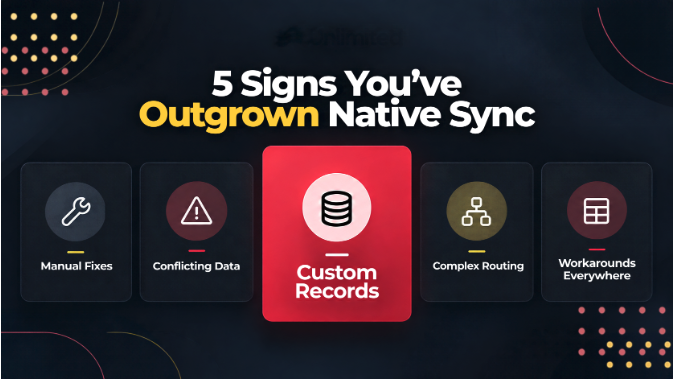
These are some of the most common signs that it may be time to reevaluate your current set up.
-
Your Team Is Fixing Data After It Syncs: If someone regularly has to correct records, update fields, merge duplicates, or manually repair orders, the integration is not actually eliminating manual work.
-
Important Information Lives in Custom Records: If the information your teams depend on lives outside the standard records supported by the native integration, you may need an integration that understands those records.
-
Routing Depends on Business Rules: If orders, customers, products, or opportunities need to go to different places depending on subsidiary, geography, product, currency, or other criteria, simple field mapping may not be enough.
-
Sales and Finance See Different Versions of the Truth: If sales sees one status in HubSpot while finance sees something different in NetSuite, the integration may not be syncing the right information at the right point in the process.
-
You've Built Workarounds Around the Integration: Spreadsheets, Manual exports, Extra HubSpot workflows. Slack messages asking someone to update NetSuite.
Those are often symptoms of an integration that no longer matches the business process.
Getting Your HubSpot NetSuite Integration Right
The right integration starts with understanding how your business actually works. Before choosing native sync, Karana, another iPaaS, or a custom integration, identify what data needs to move, where it should go, what rules need to be applied, and what should happen when something goes wrong.
Sometimes HubSpot's native integration is enough. Sometimes you need the added flexibility of Karana or another iPaaS. And sometimes the business requirements call for a fully custom solution.
Explore our custom client solutions, learn more about Karana, or see how we approach custom integrations.
Contact us to continue to conversation