











.png?width=1254&height=1254&name=Newsletter%20Envelope%20Icon%20(3).png)


HubSpot Agent Builder gives companies a new way to bring AI directly into the processes they are already running or want to build inside HubSpot.
But for most teams, the real question isn’t, “What is Agent Builder?” It’s, “What could we actually use it for, and where could it make our team more efficient?”
Some of the biggest opportunities aren’t massive AI transformation projects. They’re the repetitive, time-consuming parts of revenue operations: digging through CRM records, interpreting what the data means, deciding what should happen next, and passing that information to another person or team.
These are the tasks that quietly create bottlenecks and waste an employee's time. HubSpot’s
Agent Builder creates an opportunity to automate more of that work so your team can spend less time gathering and interpreting information and more time acting on it.
In this blog we are going to dig through some of the 7 AI HubSpot agents that are worth building and will add value to your company's processes.
1. Make the Closed-Won Handoff Easier
When a deal closes, the sales often celebrate. Then a Customer Success or implementation team has to piece together what actually happened during the sales process.
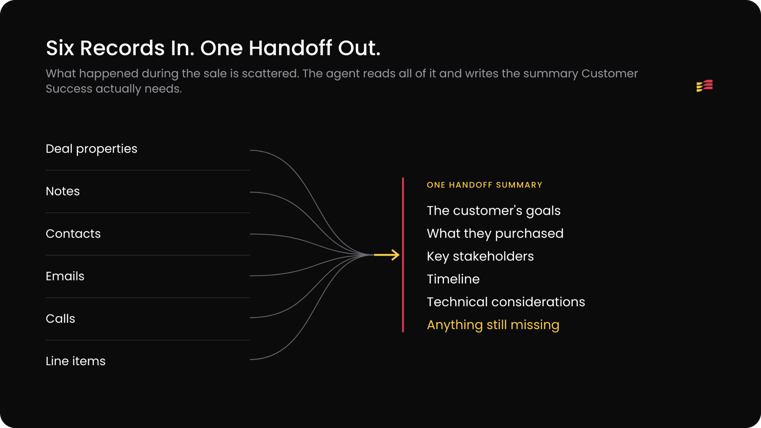
Many times, the information becomes scattered - and there are a bunch of fields that do not get filled in such as deal properties, notes, contacts, emails, calls, and line items.
Due to this fact, we recommend building an agent that reviews all of the fields and creates a single handoff summary covering:
- The customer's goals
- What they purchased
- Key stakeholders
- Timeline
- Technical considerations
- Anything still missing
It doesn't replace the salesperson's handoff. It gives the next team a real starting point instead of a blank one and makes filling in the information much easier.
2. Surface Deals That Need a Second Look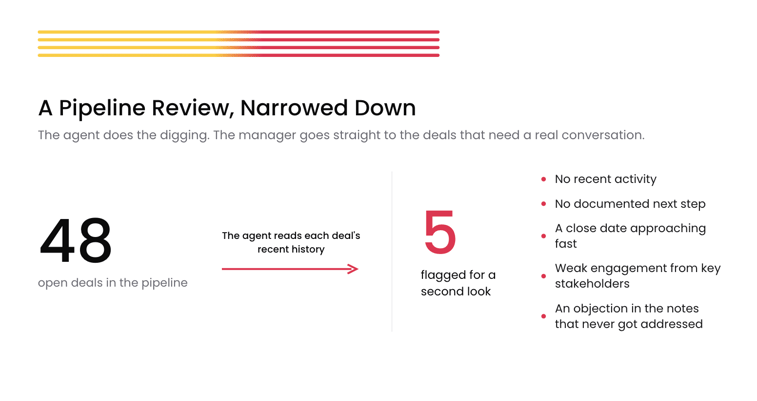
Pipeline reviews can really waste time. For example a sales manager sees a deal sitting in a stage and has to open the record just to figure out whether it's actually moving. To save time and create time efficiency you should build an agent that reviews each deal's recent history and creates flags based on information input or lack or information such as:
- No recent activity
- No documented next step
- A close date that's approaching fast
- Weak engagement from key stakeholders
- Objections buried in the notes that never got addressed
This agent is using AI to do the digging so the employee can go straight to the deals that need action taken place.
3. Give Sales Reps Better Context Before Outreach
Creating quick summaries will save sales reps time. They do not need more data but they need the data they can actually use quickly.
Before a call, a rep jumps between contact records, company info, past activity, marketing engagement, and old conversations just to remember who they're talking to.
When a sales rep is bouncing between back to back calls, this can create distraction. To avoid that distraction you should build an agent that turns all of that data into a one-paragraph pre-call summary.
Instead of five open HubSpot tabs, the rep opens one: here's who this company is, what they've done with us before, what they're interested in now, and what's still missing.
Using AI to summarize the data you already have will save the reps time and create an easy to view summary before each call.
4. Catch Missing Information Before a Quote Is Built
If you have got to the quote phase you are in a good place and this is not an area you want to lose momentum. In some situations the quoting process can create problems due to not having all of the right data.
The quote itself usually isn't what slows down quoting. The problem starts before the quote is even created.
To avoid this you can create your own quote-readiness agent that reviews the deal before it hits CPQ and flags what's missing.
For a complex quote-to-cash process, that cuts out a round or two of back-and-forth before the customer ever sees a number.
5. Prepare Account Teams for Renewals
Similar to customers you already have won and have deals with, the renewal or add on prep can create bottlenecks. Employees spend more time gathering information than actually talking to the customer or setting the time to discuss potential options with them.
Another useful agent is to help prepare employees with details on the current customers. Your agent can review the account's history and lays out:
- What the customer purchased
- Current products or services
- Recent activity
- Open issues
- Past commitments
- Upcoming renewal timing
It can also flag anything worth investigating before the conversation happens.
The account manager still owns the relationship. The agent just clears the research off their plate.
This agent will help great employee efficiency and give visibility into what is coming up.
6. Give Teams Faster Context During Customer Escalations
When a customer issue turns urgent, nobody has 20 minutes to dig through HubSpot for the backstory.
Building an escalation agent that pulls all of the customer data into one summary, will save headaches and reduce emergent stress for your teams. You can build this AI agent to provide you data on:
- Ticket history
- Recent conversations
- Open commitments
- Key contacts
- Account information
Therefore when an issue is escalated, they get context immediately instead of after 20 minutes of digging.
This is worth remembering: an agent's value isn't always about taking action on its own. Sometimes it's just helping a person understand the situation faster.
7. Find Problems in Your CRM Data
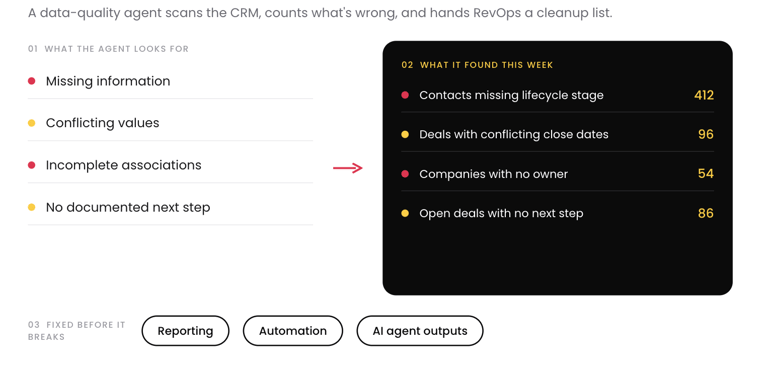
Quality data is key to keeping your CRM health good.
Incomplete or inconsistent records hurt reporting and automation. Along with that, they will also hurt your AI outputs too.
To avoid this you should build a data-quality agent that scans for:
- Missing information
- Conflicting values
- Incomplete associations
- Deals with no documented next step
That gives teams a direct list of where to clean up - before it breaks something else.
Where Should You Start?
Don't start by asking your team "what AI agent should we build?"
Look at how work actually gets done today. Look at these questions:
- Where do people keep opening five HubSpot records just to piece together what happened?
- Where are they writing the same kind of summary over and over?
- Where does missing information stall the next person in line?
You do not have to build all 7 agents, but instead pick one. Define what a useful result looks like.
Agent Builder Still Depends on a Strong HubSpot Foundation
An AI Hubspot agent does not remove the need for good RevOps. It raises the bar.
An agent is only as good as:
- Your CRM architecture
- Data quality
- Properties and associations
- Automation and integrations
- How clearly you've defined your processes
That's the real opportunity.
At Unlimited Tech Solutions, we help businesses build HubSpot around how company’s revenue teams actually work - CRM architecture, integrations, automation, reporting, CPQ, and custom solutions.
As HubSpot keeps expanding its AI capabilities, the companies that win will be the ones that know which problems are actually worth solving.
Frequently Asked Questions