











.png?width=1254&height=1254&name=Newsletter%20Envelope%20Icon%20(3).png)


HubSpot is doubling down on precision engineering for February. If you’ve had trouble keeping up with the latest betas, we’ve got you covered. This month, we’re focusing on the tools designed to act as "safety nets" for your data and a brain for your Breeze AI Assistant.
As a proud Elite HubSpot Partner, Unlimited Tech Solutions is excited to spotlight these releases. We know that "custom" and "complex" shouldn’t stop you from reaching your full potential, these updates address the real-world concerns we hear from our clients every day.
More Context, Even Better Control.
Breeze AI: More Context for Better MarketingBreeze is getting the context it’s been missing for marketers: Academy content, website analytics, persona awareness, and Loop playbook guidance. Breeze can now:
- Create Property Validations with validation rules using natural language prompts.
- Craft conversation starters to help you get going faster with Custom Assistants.
(Exclusively on the Breeze Assistant mobile app)
Breeze Assistant now has access to:
All of HubSpot Academy's content
Breeze Assistant can even show clipped Academy videos inline related to a user's question.
Website analytics as a data source.
Marketers can now "talk to their data" in Breeze Assistant and generate reports on their website traffic and conversions.
Persona awareness.
Breeze Assistant now knows whether the user is a marketer, so it can tailor its responses to what marketers need.
Loop Marketing expertise.
Breeze Assistant now has access to a comprehensive Loop Marketing playbook. When a marketer asks a "how to" marketing question in Breeze Assistant, Breeze can now tailor its response based on Loop Marketing's best practices and tactical advice.
Call recording can be toggled by inbound vs outbound
You can now choose to record calls based on direction: Inbound or Outbound.
Ideal for regulated clients or those operating across regions. This simple settings modification can help lower risk while preserving all recordings.
Rolling dates now work with “is before” and “is after”:
-
Why it matters: This lets your filters update automatically over time, without needing to reset fixed dates. You can now build filters like:
-
The create date is before next week
-
Close date is after today
-
Renewal date is before the end of the month
-
Great for ops maintenance!
-
Build better form performance dashboards
-
Why it matters: Custom Report Builder now supports Form Submissions. You can now build a variety of reports based on form submissions to understand:
-
How your forms are performing
-
Slice and dice form submissions data, and much more.
-
Useful for multi-form, multi-brand portals.
-
Clean Up Your CRM While Scaling AI
Merge History CSV Export finally gives us a safety net.
- Why it matters: We can now recover pre-merge property values when someone merges the wrong records. This closes a long-standing data-loss gap.
Personalization app now supports website pages
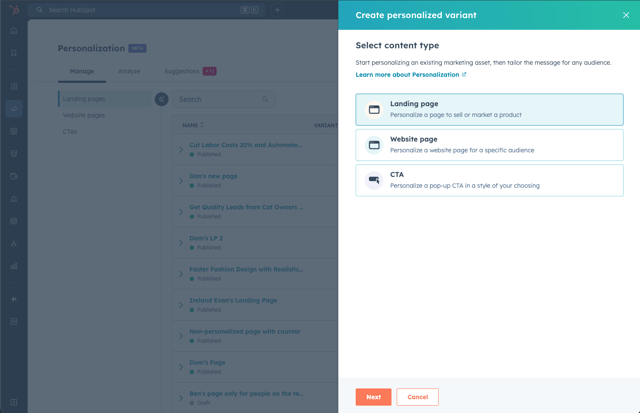
- Why it matters: Website personalization no longer requires duplicating pages or tracking performance in three places.
Claude can now write to the CRM and read engagement history
The HubSpot connector for Claude can now create and update CRM records and log activities (engagements) directly from Claude’s chat window – including new contact and deal creation, and logging notes or tasks. Claude can also generate on powerful insights based on your complete engagement history like emails, calls, meetings, tasks, and notes.
- Why it matters: This turns Claude from a side analysis tool into something that can actually move deals, tasks, and notes forward.
Customer Agent source performance reporting
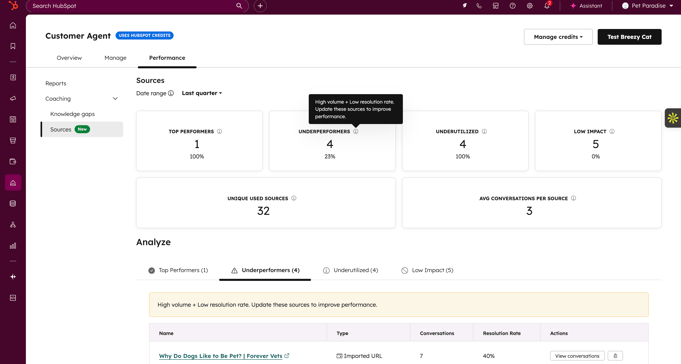
- Why it matters: Previously, when a HubSpot Customer Agent resolved a ticket or failed to help a customer, there was no clear way to see which piece of content the AI was using.
This tool creates a systematic "coaching" dashboard that categorizes your content into four distinct buckets based on real conversation data:
- Top Performers: High-volume, high-resolution content that is accurately solving problems.
- UnderPerformers: Frequently used content that is leading to poor outcomes (needs editing).
- Underutilized: Valuable content that isn't being referenced enough (needs better surfacing).
- Low-Impact: Content that isn't contributing to resolutions (candidates for removal).
28-day free access to Customer Agent
- Why it matters: Get 28-days free access to customer agent that starts when you deploy the agent, allowing you to test it in real-world scenarios without using paid credits.
Assign CRM views to any team
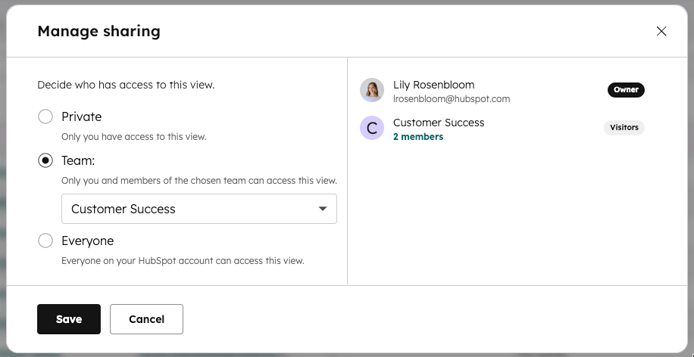
- Why it matters: Super Admins no longer need to join a team just to share views. This removes a common setup annoyance, giving you full control to distribute views across teams as needed.
Add comments to workflow triggers: - LIVE
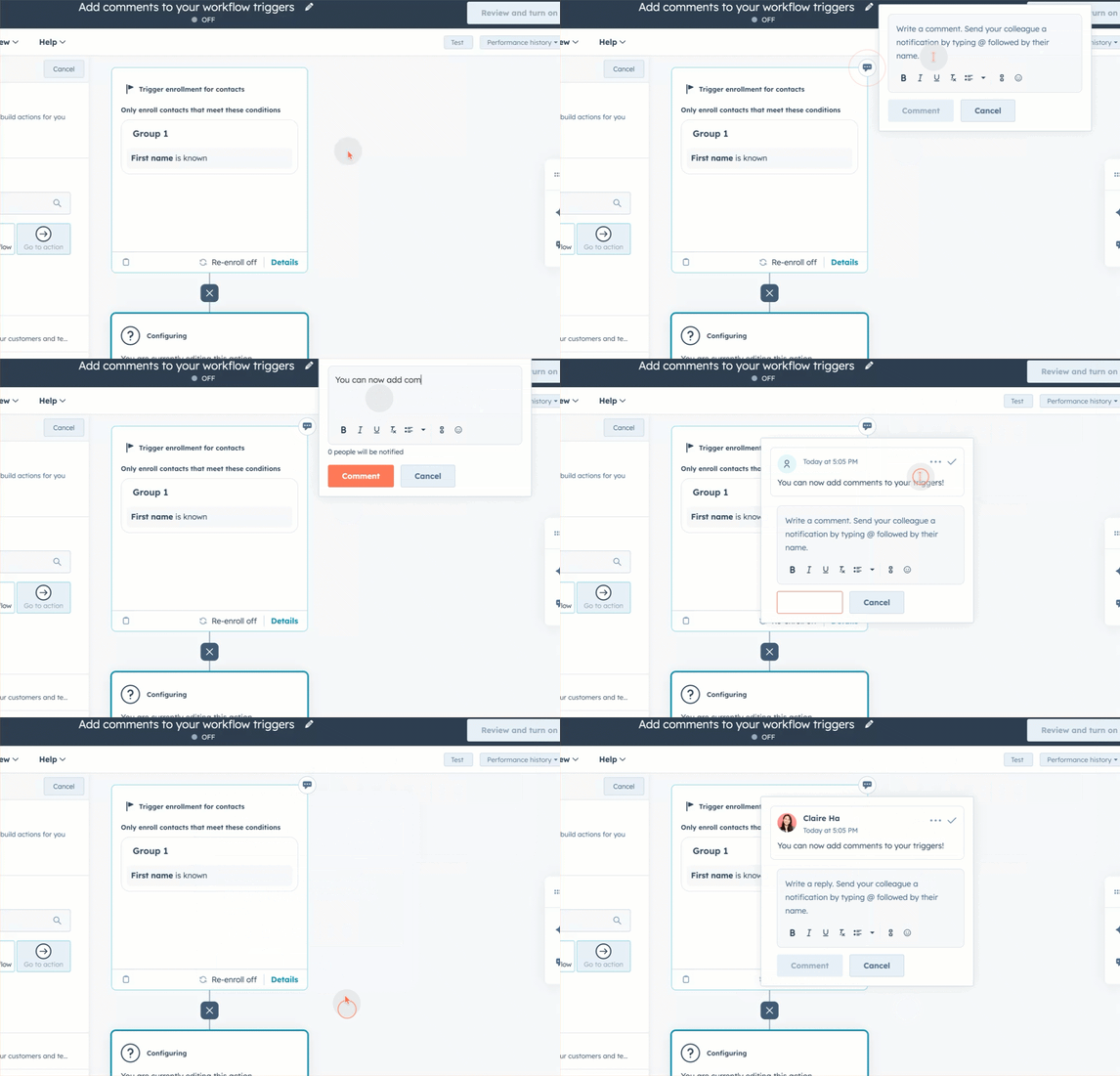
- Why it matters: By commenting on triggers, teams can reduce confusion, speed up reviews, and make workflows easier to understand for collaborators, especially when onboarding new teammates or revisiting workflows later.
Video editor UX improvements
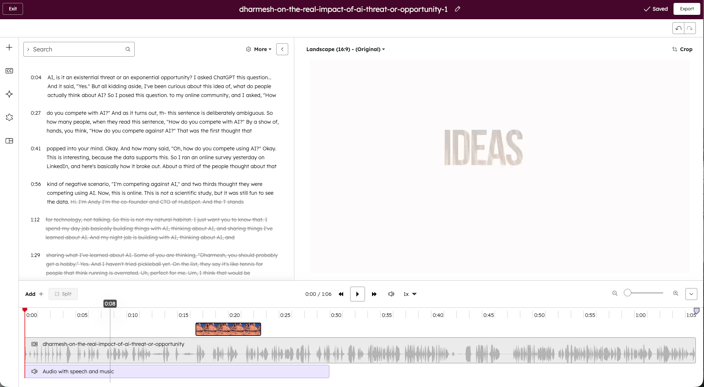
- Why it matters: For content marketers, this means fewer interruptions in your workflow, better control over timing and layout, and more confidence when making fine-grained edits. The result is faster turnaround and cleaner videos without needing advanced editing expertise. With this update you can now:
- Place and adjust overlays with precision.
- Undo and redo transcript edits at any time.
- Resize or collapse the transcript panel to customize your workspace.
- Use a single, unified panel for captions and translations in the left side navigation.
- Preview different languages instantly from the language dropdown in the editor toolba
- Add media from a new dedicated Assets panel (click the "+" icon in the left toolbar).
- Adjust video volume directly from the timeline.
Publish Facebook Stories from HubSpot
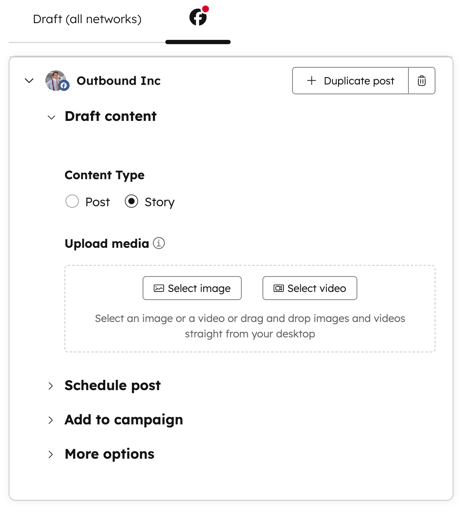
- Why it matters: Removes the need to jump into Meta tools for Stories, but only matters for teams actually using FB Stories.
Strategic Intelligence & Precision Ops Updates
Segments Just Got Way Smarter With Real-Time Filter Insights
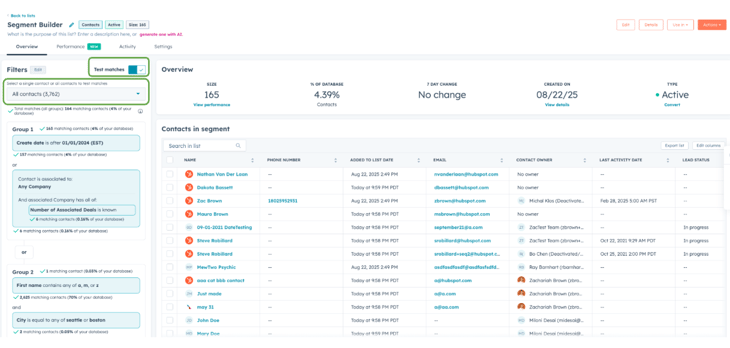
Why it matters: Thanks to Granular Filter Insights, you can now see exactly how each filter shapes your segment as you build it. You will now be able to see exactly:
- How many records match at each step
- Which filters are expanding or narrowing your audience
- Whether a filter has no effect at all (clearly flagged at 0 matches)
Note: Certain filter types are not supported for insights, so counts for those branches will not be added to your group level totals.
Manage Permissions on Line Items
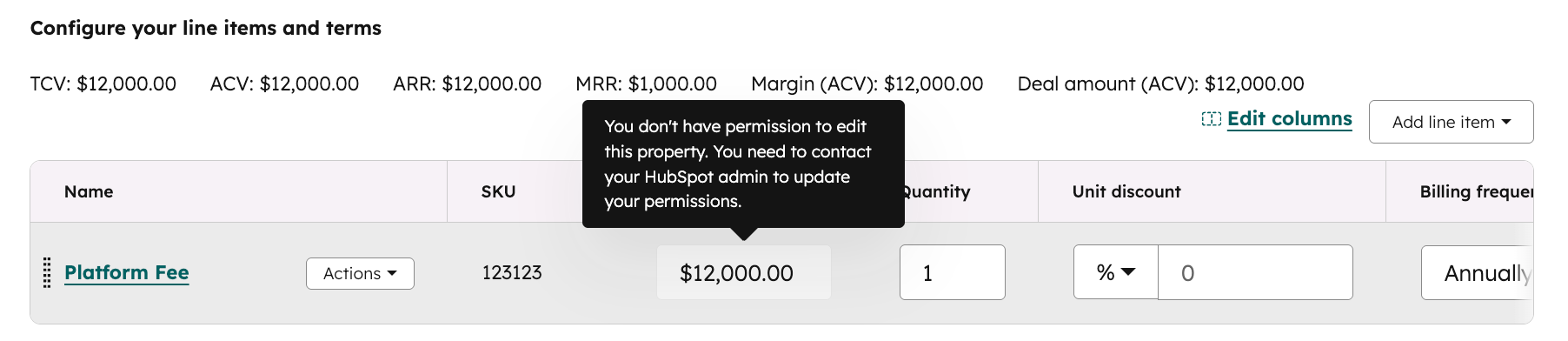
- Why it matters: Until now, line items didn’t support field-level permissions. With this update you can now restrict access to specific line item properties (like name, unit price, or discount) by user or team. This gives you greater control and security within your quoting and sales workflows.
Subdomain Filtering in Buyer Intent - LIVE
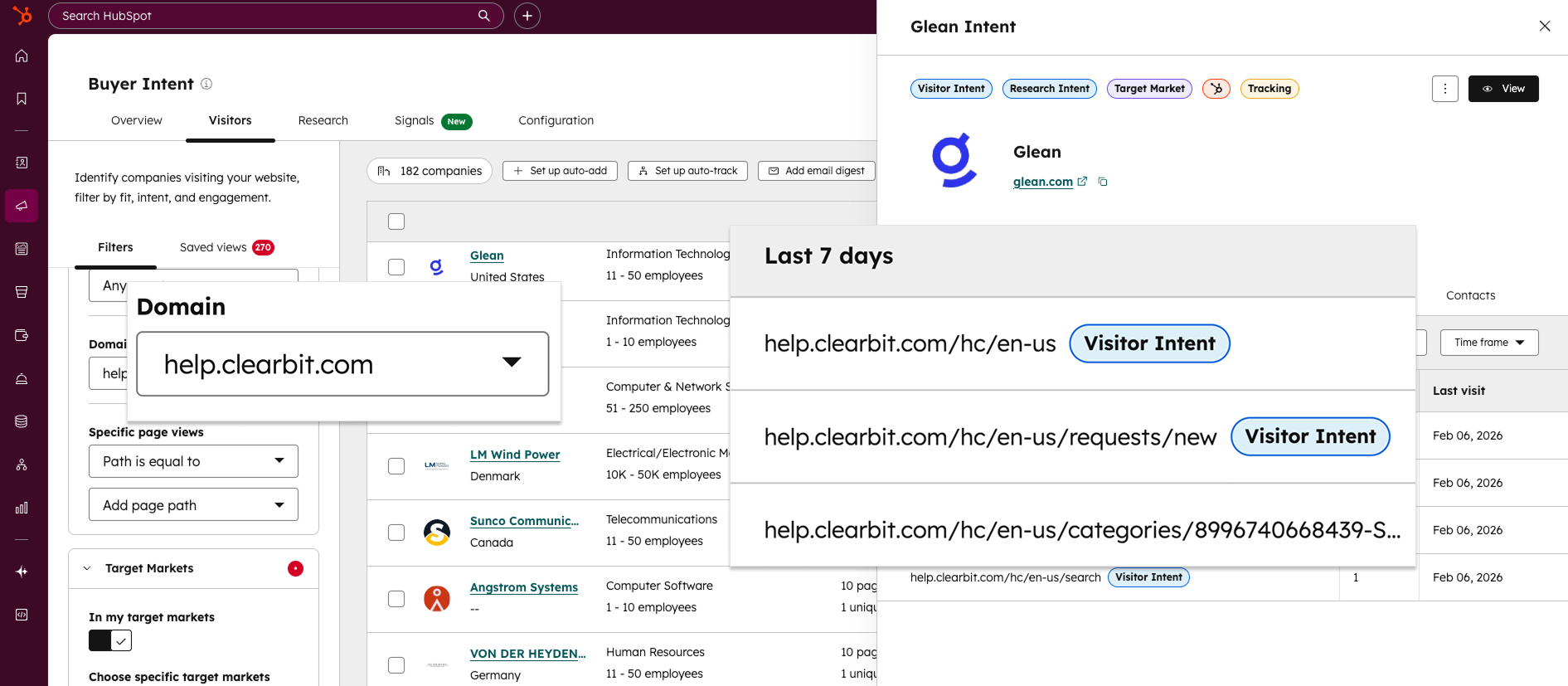
Why it matters: You can now filter for and segment by subdomains in buyer intent—giving you a clearer picture of who's visiting and where. Starting today, you can now do the following:
- Segment traffic across different brands or business units: For larger companies managing multiple websites on subdomains, you can now easily differentiate traffic. Create unique views and intent criteria for each specific brand, product, or business unit.
- Separate app users from marketing prospects: Is your app on a subdomain like
app.yourcompany.com? Easily distinguish between product users and prospects on your marketing site to focus your team's outreach on the right accounts. - Track campaign performance with precision: If you run marketing campaigns on dedicated subdomains, you can now isolate that traffic. Hone in on campaign-specific visitors to measure performance and generate leads more effectively.
Outbound Email → Create Ticket in Help Desk
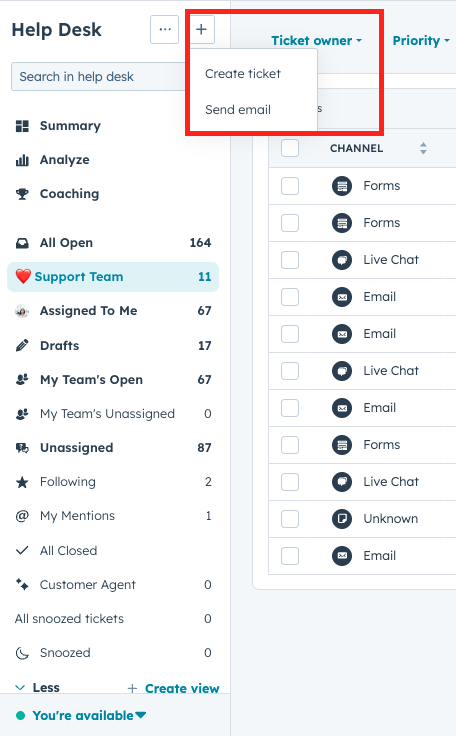
- Why it matters: Users can now send an outbound email to create a ticket in help desk.
This update also addresses customer feedback requesting that tickets can be created in help desk from new outgoing emails, not just incoming messages.
Marketing Campaign: UTM Settings Page (Pro/Ent)

- Why it matters: If you use UTMs, this update is for you. The new UTM Settings experience for Campaigns makes it easier to manage how campaign UTMs are generated and maintained across your HubSpot account.
- Tactical note: Audit existing UTM governance. This reduces future tracking breakage, but clients who previously opted out may need a decision on standardization.
Live Chat Now Actually Respects Agent Availability
- Why it matters: Visitors can no longer send messages when all agents are “away” if chat is set to disable. This fixes a long-standing inconsistency. Previously, visitors could still send messages when all agents were set to “away”, even if the chat was configured to be disabled during agent unavailability.
Nested Folders for Sales Documents
- Why it matters: Sales collateral can now live in multi-level folder structures. Cleaner libraries, less duplication. Navigating your new library is easier with:
- Breadcrumbs: To make deep hierarchies easy to navigate, clickable breadcrumbs now appear on index, folder, and document detail pages.
- Unique Naming: Folder names must be unique within the same parent folder. If you have existing duplicate names, HubSpot will automatically append a "(1)" to the most recent version to ensure clarity.
- Search: Results now display visible folder paths so you know exactly where a document lives.
- Breadcrumbs: To make deep hierarchies easy to navigate, clickable breadcrumbs now appear on index, folder, and document detail pages.
Approvals Notifications now available in Slack and Teams
- Why it matters: Approval workflows now ping directly in Slack or Teams instead of relying only on email. For Enterprise clients only.
Admin Toggle for Sales Workspace Version
- Why it matters: Super admins can now switch the entire portal between the old and updated sales workspace. Until now, existing users could only access the updated workspace through a temporary beta opt-in or by contacting support.