











.png?width=1254&height=1254&name=Newsletter%20Envelope%20Icon%20(3).png)


HubSpots Revenue Hub can handle HubSpot quotes for almost any product, from a simple catalog order to a fully configured, rule-priced product with margin approvals. It comes down to which of three paths fits your setup, no matter how complex your product, pricing, or approvals are. Since HubSpot rebranded Commerce Hub to Revenue Hub back in June, we've been hearing the same question: "Can HubSpot actually handle our pricing needs?" The answer is yes, for almost everyone.
Every HubSpot quotes scenario we've run into, from a simple catalog order to a multi-level configured product with margin approvals, fits cleanly into one of three paths. Once you know which one you're in, you can move forward with confidence.
Match the path to your product
This comes down to matching the path to how complex your product, your pricing, and your approvals actually are. If you're selling from a defined catalog, Path 1 is likely all you'll ever need. If you need real configuration, real pricing rules, and real approval oversight, Path 3 is built for exactly that. Here's how to tell which one fits.
Path 1: HubSpot CPQ
This is Revenue Hub exactly as HubSpot ships it: the Configure-Price-Quote flow built into the deal record, with a product library, quote editor, e-signature, and payments, all inside HubSpot.
|
Best for |
A defined catalog with list price transactional or self-serve speed, volume and price-book pricing, and light, manually-applied discounts. |
|
Why it matters |
If this is you, you're ready to go today, no customization is needed. |
|
Why it works |
Quote assembly pulls together a clean, fast quote from what's already in your catalog, with built-in warnings and blocks on publish to keep quotes from going out incomplete or out of bounds. |
|
Maintenance |
Included in your HubSpot subscription |
If your catalog is simple and your discounting is manual, this is usually enough.
Path 2: HubSpot + Custom Development
This is where a developer can extend the native experience with a custom UI, some additional properties, and a custom object or two. This is all done still entirely inside HubSpot.
|
Best for |
A handful of configuration options with a guided experience, a few tailored fields, light calculated math, and filling specific gaps for your unique catalog. |
|
Why it matters |
Solves a well-defined, contained need with a solution built just for you. |
|
Where it shines |
Bridging a specific gap without leaving HubSpot or adopting/adding a new platform. |
|
Maintenance |
Includes both the build and the maintenance that comes after, your team owns both as part of going custom. |
This path is a genuine investment: you're funding a custom build, and your team takes on the ongoing maintenance once it's live. It's the right fit when your gap is small and well-defined.
Path 3: HubSpot + Karana CPQ
A complete CPQ platform, Karana brings all your data and the entire user experience together inside HubSpot, backed by a rules engine that applies your pricing and configuration logic consistently, every time. This is where configuration, pricing, and quoting all get the oversight they need.
|
Best for |
Configurable products with variants and multi-level bills of materials, rule-driven or config-dependent pricing, deal-desk governance, and AI-assisted quoting. |
|
Why it matters |
Adds hard pre-write guardrails, so every configuration and quote is validated and on-margin before it's ever written. |
|
Where it shines |
Rule changes happen by editing logic right in-app, and an AI agent can configure and price a deal straight from your real catalog. |
|
Implementation |
Karana is a configurable platform, brought in with migration services to bring your catalog, pricing rules, and approval logic over, this is a real setup project, not a flip of a switch. |
|
Maintenance |
Covered under your Karana CPQ subscription, no separate development cost or bespoke code for your team to maintain once it's live. |
The three paths, at a glance
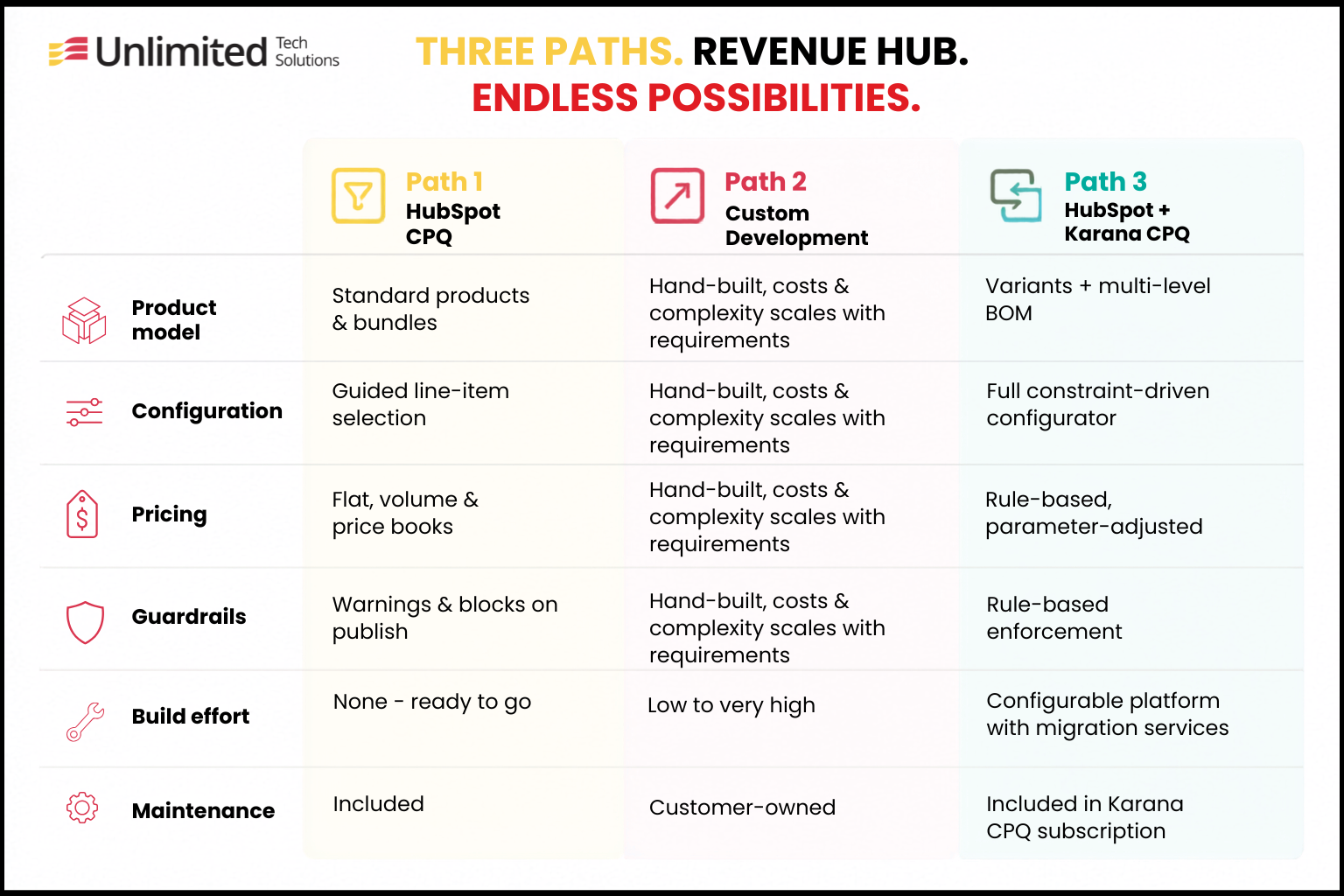
HubSpot Revenue Hub Can Scale with you.
Revenue Hub scales with your catalog, not against it. A simple list of products, a few custom fields, or a fully configured product with pricing rules and approvals, each has a path built for it. The only real decision is matching your complexity to the right one.
Frequently Asked Questions