











.png?width=1254&height=1254&name=Newsletter%20Envelope%20Icon%20(3).png)


Most companies don’t start looking at HubSpot because Salesforce suddenly stopped working.
They start looking because it has become too expensive, too difficult to manage, or too hard to change.
That can show up in a lot of ways:
- Small updates require a specialist.
- Reports take more work than they should.
- Integrations need constant attention.
- Admin costs keep growing.
- Teams create workarounds outside the CRM.
And then the same objection comes up:
“But Salesforce is for big, complex companies. HubSpot is for smaller businesses.”
That is the myth.
It made more sense years ago, when HubSpot was primarily known as a marketing platform for smaller companies. But HubSpot has changed significantly, and the old “Salesforce for enterprise, HubSpot for SMB” comparison has not kept up.
Today, both platforms can support complex sales teams, automation, reporting, forecasting, AI, integrations, marketing, service, and large amounts of customer data.
This isn’t about arguing that Salesforce is bad or that every company should move to HubSpot.
It’s about busting a few assumptions that still shape how Salesforce and HubSpot are compared:
- Myth #1: Large or complex companies need Salesforce.
- Myth #2: Salesforce is automatically more powerful because it is more complex.
- Myth #3: The biggest difference between HubSpot and Salesforce is license price.
- Myth #4: If you move from Salesforce, you need to recreate everything you already built.
Those assumptions can keep companies on a system that no longer fits simply because switching feels like a step backward.
The better question is:
Is your CRM making things harder than they need to be?
Here’s what to look at before you decide.
Myth #1: Large or Complex Companies Need Salesforce
For years, Salesforce was the main choice for enterprise companies and HubSpot as the simpler option for smaller teams.
HubSpot has spent the last several years building for larger and more complex organizations. Companies can now run sophisticated sales, marketing, service, automation, reporting, and integration environments within the platform.
There is very little we as a team can do in Salesforce that we cannot also accomplish in HubSpot.
That does not mean the platforms are identical. It means company size alone is no longer a very good reason to choose one over the other.
Instead, ask:
- How complicated are your actual business processes?
- How much customization do you really need?
- How many systems need to connect to your CRM?
- How quickly does your team need to make changes?
- How much ongoing administration are you willing to support?
A company with hundreds or thousands of employees does not automatically need Salesforce simply because it is large.
Complexity should come from the business, not from the logo on the CRM.
Myth #2: More Complexity Means More Capability
 HubSpot and Salesforce are direct competitors.
Think Coke and Pepsi. Mac and PC.
Both platforms support:
- Automation
- Reporting
- Forecasting
- AI
- Integrations
- Marketing
- Sales
- Service
The biggest difference often is not whether something can be done.
It is how much work it takes to set it up, run it, change it, and connect it to everything else.
Part of that comes from how the two platforms developed.
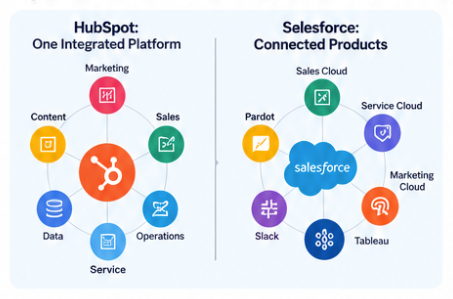
Salesforce expanded through acquisitions that included products such as Pardot, Tableau, Slack, and Marketing Cloud. Those products are part of the broader Salesforce ecosystem, but many still operate as separate products or services that need to be connected, configured, managed, and paid for.
HubSpot was built around a shared CRM, with marketing, sales, service, content, operations, and data tools using the same underlying customer record.
Why does that matter?
Because every additional product can introduce another layer of complexity:
- Another integration to maintain
- Another permission structure
- Another place where data can become inconsistent
- Another tool your team has to learn
- Another thing someone has to administer
Here is a simplified comparison:
|
HubSpot |
Salesforce |
|
|
How it’s built |
One system with shared data |
Core CRM plus additional products and acquired platforms |
|
Setting it up |
Often configured without developers |
Larger implementations frequently involve developers and custom code |
|
Running it |
Can often be managed by your own team or with support from a Solutions Partner |
Complex environments may require dedicated admins, developers, or outside consultants |
|
Making changes later |
Many changes can be made quickly |
Changes can become more involved in heavily customized environments |
|
Ease of use - Capterra |
4.4 / 5 |
4.0 / 5 |
|
AI |
Breeze, paid through HubSpot Credits |
Agentforce, paid through Flex Credits |
Capterra ease-of-use scores: HubSpot Sales Hub 4.4/5 based on 506 reviews compared with Salesforce Sales Cloud at 4.0/5 based on 18,811 reviews. Salesforce has significantly more reviews, so the ratings should be treated as a general signal rather than a perfect one-to-one comparison.
Ease of use may sound like a soft benefit, but it affects the quality of your CRM data.
When a CRM becomes difficult to use, people start working around it. They may:
- Build spreadsheets
- Skip fields
- Stop updating records
- Create separate processes outside the CRM
Then the data becomes less reliable.
And once people stop trusting the data, they stop trusting the reports too.
Myth #3: The Biggest Cost Difference Is the License Price
When companies compare HubSpot and Salesforce, pricing tables get a lot of attention.
That makes sense, but the license is only one part of the cost.
For a 25-person sales team, published pricing looks roughly like this:
|
Plan |
Published price |
Year-one cost, 25 users |
|
HubSpot Sales Hub Professional |
$90/user/month + $1,500 onboarding |
$28,500 |
|
Salesforce Pro Suite |
$100/user/month |
$30,000 |
|
HubSpot Sales Hub Enterprise |
$150/user/month + $3,500 onboarding |
$48,500 |
|
Salesforce Core |
$195/user/month |
$58,500 |
|
Salesforce Advanced |
$395/user/month |
$118,500 |
Published pricing above assumes annual commitments. Salesforce Max lists at $550 per user per month.
View HubSpot Sales Hub pricing
At the lower tiers, the license prices can look relatively close.
But that is not where the comparison ends.
Total cost of ownership
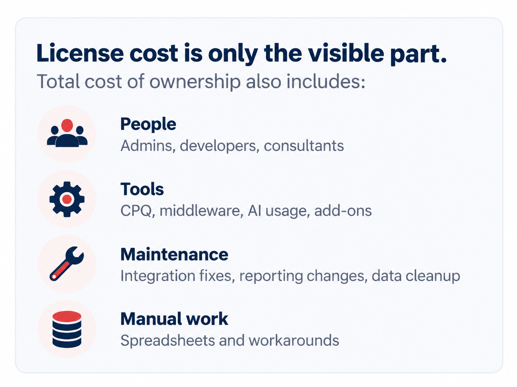 The cost of a CRM includes what you pay for the platform, but it also includes what it takes to keep that platform working.
That can include:
- Add-ons: quoting, marketing, reporting, AI, premium support, and other functionality
- Usage fees: AI, data, or activity tied to credit-based or consumption pricing
- People: admins, developers, consultants, and outside support
- Changes: development work for new workflows, reports, fields, or integrations
- Manual work: spreadsheets and side processes created when changing the CRM becomes too difficult
Implementation quality matters too.
A big first-year discount does not help much if the system is set up incorrectly and you spend the next two years paying someone to fix it.
So the better question is not:
What does the CRM cost this year?
It is:
What will this CRM cost us to operate, maintain, change, and support over the next several years?
Should You Stay on Salesforce or Switch to HubSpot?
This is where the comparison becomes practical.
Salesforce is not automatically the wrong choice because it is more complex. HubSpot is not automatically the right choice because it can be easier to manage.
The real question is whether the complexity in your current CRM is delivering value.
Staying on Salesforce may make sense if:
- You have invested heavily in custom development that supports important business processes.
- Your team uses Salesforce consistently.
- Your current setup is stable.
- The CRM is not slowing down the business.
- The cost and administrative effort are justified by what the platform delivers.
If Salesforce is doing exactly what you need and your team is comfortable using it, moving simply for the sake of moving does not make sense.
Switching to HubSpot may be worth evaluating if:
- Your CRM costs too much to maintain.
- Your team finds it difficult to use.
- Simple changes regularly become development projects.
- Old customizations make it hard to change how the business operates.
- Add-ons, admin costs, consulting fees, or integration expenses keep increasing.
- Important work is happening in spreadsheets because changing the CRM is too difficult.
- Teams are working across disconnected systems and struggling to maintain consistent data.
Some complexity exists for a good reason.
A useful test is this:
Can your team explain why the complexity is there and what value it creates?
If yes, keep it.
If not, it may be worth asking whether you are maintaining complexity instead of getting value from it.
Myth #4: If You Move, You Need to Rebuild Everything
This may be one of the most expensive assumptions in a CRM migration.
A Salesforce-to-HubSpot migration should not be a copy-and-paste project.
The goal is not:
Make HubSpot look exactly like Salesforce.
The goal is:
Build the CRM your business needs today.
A migration creates a rare opportunity to review years of CRM decisions before carrying them into another platform.
We like to sort everything into four categories:
Keep: Things that still work and still matter.
- Useful fields
- Important historical data
- Business-critical integrations
- Processes that users actually follow
Rebuild: Things that still matter but need to work differently.
- Outdated automation
- Reports that need to be redesigned
- Workflows built around old processes
Replace: Things that have a better option in the new environment.
- Third-party tools that HubSpot can now handle natively
- Manual processes that can be automated
- Workarounds created because the old CRM could not support the process cleanly
Retire: Things nobody needs anymore.
- Unused fields
- Old workflows
- Dead reports
- Legacy processes
- Integrations nobody relies on
The goal is not to move every piece of complexity. It is to decide which complexity is still valuable.
What Actually Needs to Move From Salesforce to HubSpot?
Before migrating anything, take inventory.
|
What you have |
What to ask |
|
Contacts, leads, and accounts |
What is worth moving? What should be cleaned first? |
|
Deals |
Do you need open deals, historical deals, or both? |
|
Fields |
Which fields does the team actually use? |
|
Custom records |
Where should this information live in HubSpot? |
|
Automation |
What should be rebuilt instead of copied? |
|
Reports and dashboards |
Which reports are still useful? |
|
Connected tools |
Which systems still need to integrate with the CRM? |
|
User access |
Who needs access to what? |
|
Activity history |
How much historical activity is actually valuable? |
HubSpot’s Smart Transfer tool can also help move data from Salesforce. It can evaluate data, map fields, transfer and clean records, and undo a transfer. Matching custom fields requires Data Hub.
Learn more in the HubSpot Knowledge Base
Tools can make the move easier, but they do not replace planning.
Before anything moves, answer three questions:
- What should move?
- What should change?
- What should stay behind?
When the Old Salesforce vs. HubSpot Rule No Longer Applies
The idea that Salesforce is for big companies and HubSpot is for small companies is outdated.
Both platforms can support large, complex organizations.
The more useful comparison is:
- How hard is the system to use?
- How expensive is it to maintain?
- How quickly can your team make changes?
- How much outside support does it require?
- Is the complexity actually helping the business?
If Salesforce is working well, your team uses it, and its complexity provides real value, there may be no reason to move.
If the CRM is becoming more expensive, harder to manage, harder to change, and harder for employees to use, HubSpot is worth evaluating.
And if you do make the switch, do not recreate every piece of Salesforce simply because it is already there.
Use the migration as an opportunity to build something cleaner.
Not sure if switching makes sense? Unlimited can review your current CRM, connected systems, and business processes before you move anything.
Contact us to continue the conversation
Frequently Asked Questions